2026-02-07

The SKILL.md Standard: Your Enterprise Guide to AI Grounding

Why structured instruction files are the hidden lever behind 20-50% AI performance gains — and how to implement them across your organization today.

20-50%
Performance improvement from structured prompts (EMNLP 2025)
80,000+
Skills indexed in SkillsMP marketplace
23%
Enterprises that can measure AI ROI
110%+
Developer productivity gains at high-adoption orgs (McKinsey)

The Grounding Problem: Why 84% Adoption Doesn't Mean ROI

The enterprise AI paradox of 2026 is stark: 84% of developers use AI tools daily, yet only 23% of organizations can measure any ROI from their adoption. CEOs are optimistic, budgets are surging, and developers swear their work is faster. So why doesn't the data match the enthusiasm?

The answer is a grounding problem — giving AI models structured context about your team's conventions, patterns, and workflows. Without it, every AI interaction starts from zero. The model doesn't know your coding standards or deployment workflows. It generates code that "looks right" but fails in review.

A 2026 Microsoft Research study titled "Beyond the Prompt" analyzed 401 GitHub repositories containing instruction files. It identified five recurring themes: Conventions, Guidelines, Project Info, LLM Directives, and Examples. Every high-performing team independently converged on the same structure.

The evidence for structured prompts is strong. The InFoBench benchmark (ACL 2024) introduced the DRFR metric — Decomposed Requirements Following Ratio — to measure how well models follow complex, multi-part instructions. Models consistently score higher when given explicit context and examples. An EMNLP 2025 survey on prompt optimization found that optimized prompts improve correctness by 20-50% compared to baseline approaches.
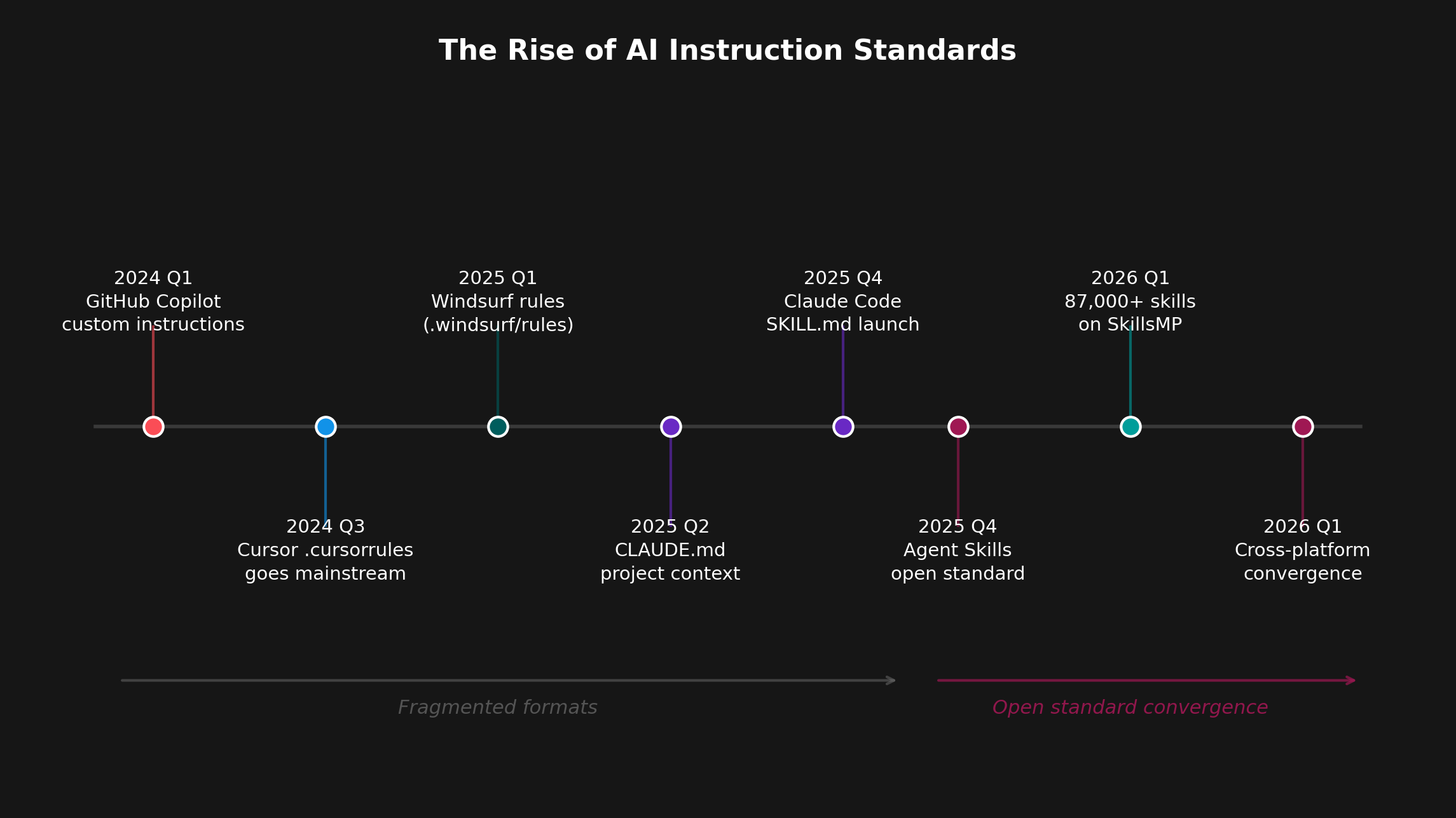
Skills adoption timeline
Figure 1: The convergence from fragmented instruction formats to an open standard happened in under 18 months. Within weeks of Anthropic's December 2025 Agent Skills release, OpenAI, Microsoft, and major AI code editors adopted the standard.

In December 2025, Anthropic released the Agent Skills specification as an open standard, and the industry converged within weeks. OpenAI adopted it for Codex, Microsoft integrated it into Copilot, and every major AI code editor (Cursor, Windsurf, Claude Code) now supports SKILL.md files alongside their legacy formats. The SkillsMP marketplace — a public index of reusable skills — now contains over 80,000 skills created by developers worldwide.

The gap between "AI helps me code" and "AI helps my team ship" is no longer a mystery. It's a grounding problem — and it has a solution.
Anatomy of a Skill: What Makes SKILL.md Work

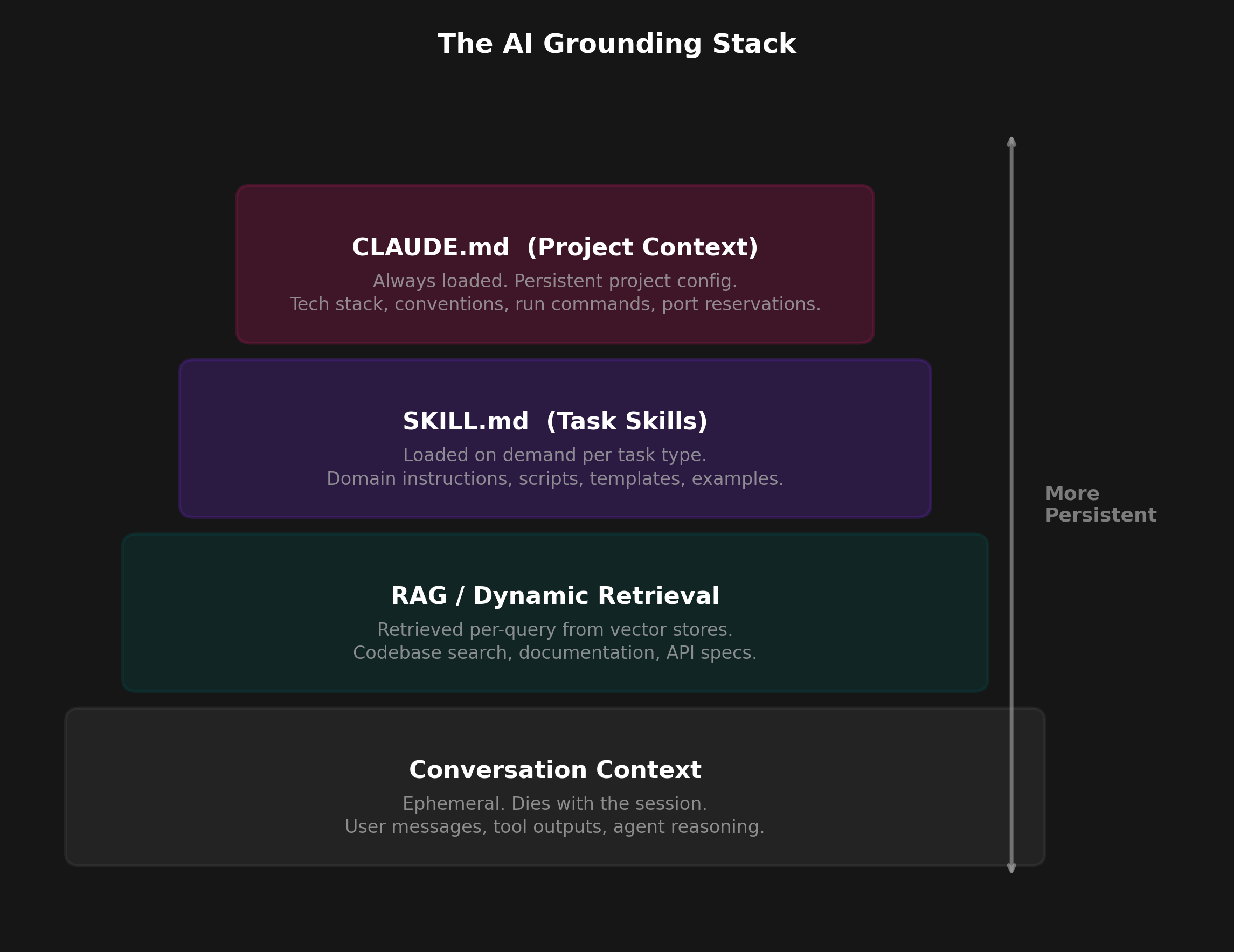
A SKILL.md file is deceptively simple: structured markdown that tells AI tools how to behave in specific contexts. It sits in a clear hierarchy of AI memory:

This hierarchy matters because each layer persists differently. Project instructions live in your repo and update with your codebase. Skills are invoked when needed, either automatically (context-triggered) or manually (user-invoked). RAG pulls in relevant documents on-the-fly. Conversations are forgotten after the session ends.

AI grounding stack
Figure 2: The AI grounding stack: persistent context layers reduce the burden on each conversation. Skills provide the middle layer between project-wide rules and ephemeral chat.

How SKILL.md Differs From Alternatives

System Prompts: Baked into the model, static across all users. You can't change GPT-4's system prompt to enforce your team's coding style. Skills are user-controlled and context-specific.

RAG (Retrieval-Augmented Generation): Dynamically retrieves relevant documents at runtime. Great for finding information, but doesn't encode instructions. RAG tells the model "here's what the API looks like"; skills tell it "always validate inputs before calling the API".

Fine-Tuning: Retrains the model on your data. Expensive (thousands of dollars), permanent (can't easily update), and overkill for instruction-following. Fine-tuning is for teaching the model new knowledge or behaviors; skills are for enforcing team conventions.

The Structure of a Skill

A minimal SKILL.md file has three parts:

The frontmatter — written in YAML, a simple key-value format — uses a user_invocable flag to control activation. If true, users can manually invoke the skill via a command (e.g., /coding-standards). If false, the AI triggers it automatically based on context clues in the conversation.


Your First Skill: Start Here Today

The best way to understand skills is to create one. Below is a minimal but realistic example: a coding standards skill that enforces your team's TypeScript conventions.

---
name: coding-standards
description: Enforces team coding standards for TypeScript projects
user_invocable: false
---

# Coding Standards

When writing or reviewing TypeScript code, follow these rules:

## Naming
- Use camelCase for variables and functions
- Use PascalCase for types, interfaces, and classes
- Prefix interfaces with I only when disambiguating

## Error Handling
- Always use typed errors: never throw raw strings
- Log errors with context: logger.error('Failed to X', { userId, error })
- Fail fast: throw immediately, don't silently continue

## Testing
- Name tests: "should [expected behavior] when [condition]"
- One assertion per test where practical
- Mock at boundaries, not internals

This skill is 20 lines and takes 10 minutes to create. Save it as .claude/skills/coding-standards/SKILL.md in your repo. Now every time a developer asks Claude Code or Cursor to generate code, the AI will automatically apply these rules.

The Three Starter Skills Every Team Needs

Don't try to boil the ocean. Start with these three high-impact skills:

  • Coding Standards — Naming, formatting, error handling conventions
  • PR Review Checklist — What to look for in code reviews
  • Error Handling Patterns — How to log, throw, and recover from errors

These three skills alone account for most of the "code looks right but fails in review" problems teams face with AI-generated code.

Tips from the Field

Cursor's team published a guide to agent best practices after analyzing how successful teams use their product. Their key lessons:

This is the key insight: skills evolve with your codebase. They're living documents that capture patterns as you discover them — not comprehensive style guides written in advance.


Planning Your Rollout: From One Skill to Org-Wide Standard

Creating your first skill is easy. Scaling it across an organization is where most teams stall. BCG's 2025 report found a striking pattern: organizations that focus on 3.5 use cases on average achieve 2.1x greater ROI than those scattered across 6.1 use cases. The lesson: depth beats breadth.

BCG: Focused Wins Over Scattered

Top-performing AI organizations concentrate on fewer, deeper use cases. They achieve 2.1x greater ROI than organizations that spread AI efforts thinly across many initiatives. Apply this to skills: one team doing it right is worth more than ten teams doing it wrong.

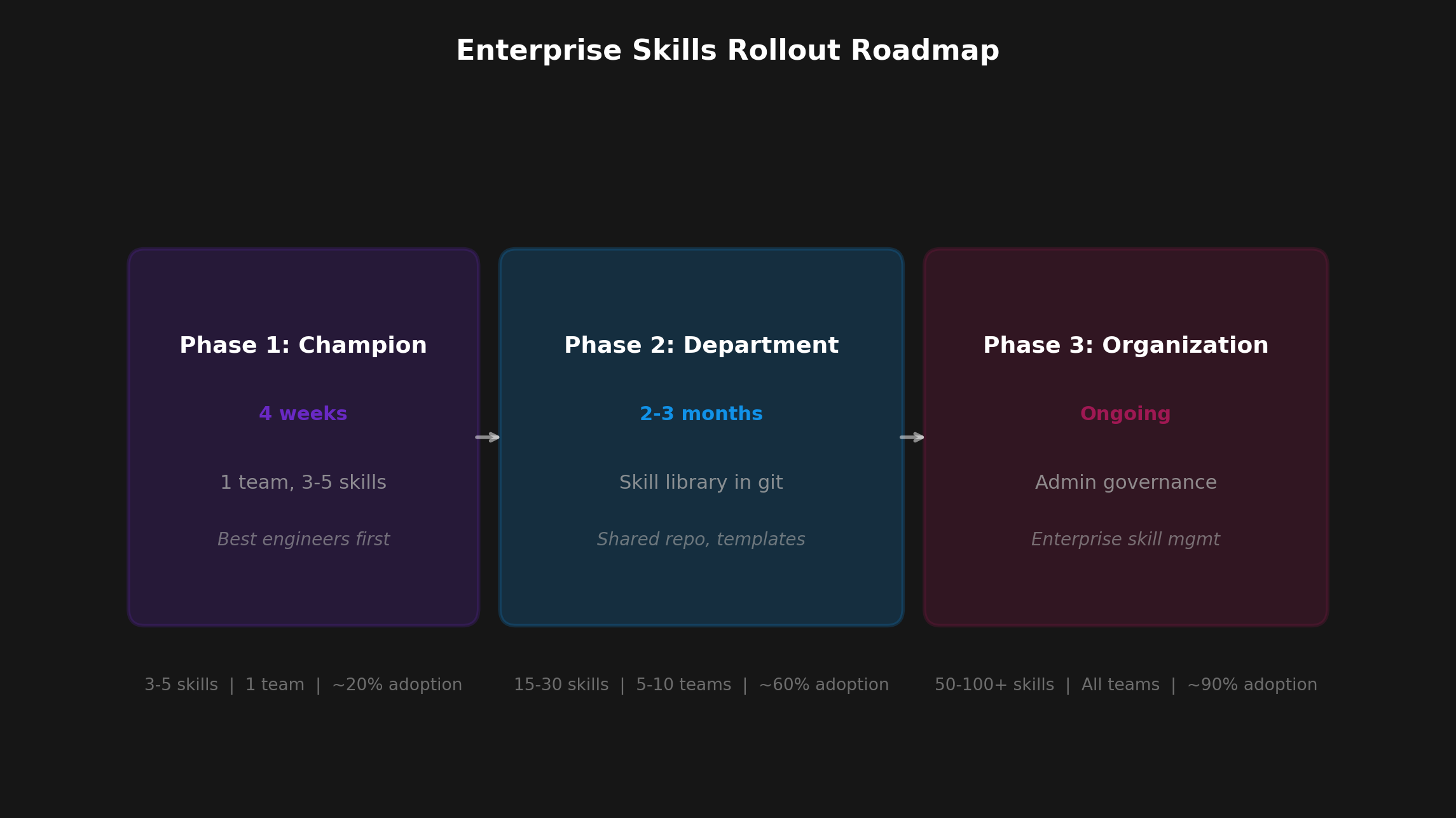
Here's a three-phase rollout that balances focus with scale:

Phase 1: Champion Team (4 Weeks)

Phase 2: Department Rollout (2-3 Months)

Phase 3: Organization (6+ Months)

Rollout phases
Figure 3: Three phases from champion team to org-wide standard. Each phase doubles the number of skills and halves the time-to-value.

Cross-Platform Teams

What if your team uses Cursor, Claude Code, and GitHub Copilot? Good news: GitHub Copilot now supports CLAUDE.md alongside its own copilot-instructions.md format. This means you can write instructions once and use them everywhere. The convergence to open standards happened faster than anyone expected — take advantage of it.


Measuring Impact: The Metrics That Actually Matter

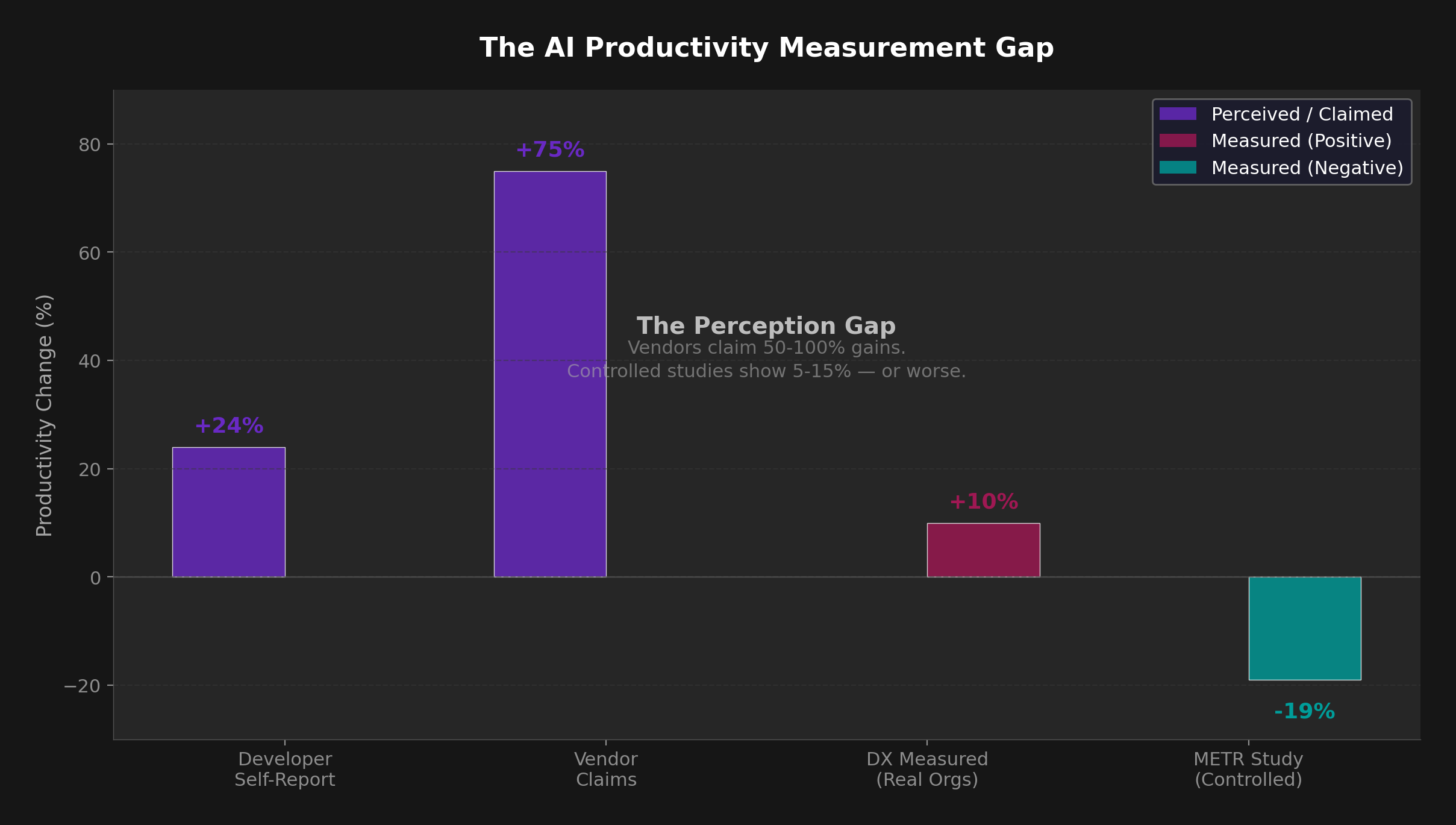
Before you can improve, you need to measure reality — not hype. DX's AI measurement framework found that real organizational improvements range from 3-12%, not the 50-100% gains vendors claim. METR's controlled study confirmed the gap: experienced developers felt 24% faster with AI tools but were actually 19% slower in measured results.

Why the disconnect? Developers feel faster because AI autocompletes code quickly. But Faros AI's analysis showed that while individual coding speed increases, delivery velocity doesn't improve — because coding is only one part of shipping software. Review, testing, debugging, and deployment still take the same time (or longer, if AI-generated code has subtle bugs). Skills close this gap by reducing rework upstream.

Measurement gap
Figure 4: Developer perception consistently outpaces measured reality. Instrument delivery metrics, not self-reports.

A Three-Tier Metrics Framework

We recommend measuring AI impact across three layers, drawing on DX research and DORA metrics (the industry-standard DevOps performance indicators):

Leading Indicators (Track Weekly)

These metrics tell you if adoption is happening. If usage is flat, dig into why skills aren't being invoked (are they too broad? too narrow? wrong context triggers?).

Process Metrics (Track Monthly)

These are proxy metrics for velocity. If skills are working, you should see fewer review cycles (AI-generated code passes review on first try) and shorter merge times (less back-and-forth).

Outcome Metrics (Track Quarterly)

These are lagging indicators of quality. If skills encode best practices, you should see fewer production bugs and less rework over time.

The Tag Framework: Machine vs Human vs Hybrid

One effective approach is tagging code contributions by origin to measure AI impact cleanly:

This lets you compare bug rates and rework rates across categories. If machine-generated code has a higher bug escape rate, your skills aren't working. If human-verified code performs identically to human-only code, your skills are working.

The 3-6 Month Measurement Window

Don't expect immediate ROI. AI adoption follows a J-curve: productivity dips initially as teams learn new workflows, then recovers, then exceeds baseline. Budget for a 3-6 month measurement window before drawing conclusions. Early drops are normal — it means people are learning.


Start With One Skill

The 80,000+ skills in the SkillsMP marketplace all started the same way: one person solving one problem. They didn't try to encode every convention, pattern, and guideline their team had ever used. They wrote down the one thing the AI kept getting wrong.

Create one skill today — your team's coding standards. Save it as .claude/skills/coding-standards/SKILL.md. Check it into git. See what happens. When the AI stops making that mistake, create another skill for the next pattern that emerges.

That's how grounding works. Not all at once, but one skill at a time.


Sources

Published 2026-02-07 · Analysis by aictrl.dev